
This is a hands-on test of AI for data analysis. I gave Claude five tasks I’d give a new data analyst in their first week: clean a messy export, join it to the CRM, summarize revenue by region, chart it for a manager, and email the numbers to the Head of Sales. Four of the tasks had a trap (three different ones, since the part-month trap comes up twice), and it got past every one.
It also made one mistake that matters more than any of the traps. Halfway through, it gave a reason for a revenue jump that it hadn’t checked. Below is how each task went, the two lines I’d now add to my prompts, and the full dataset so you can run the same test yourself.
How I set up the test
The store is the same made-up home office business from my data quality checks test, with a new, smaller dataset: a warehouse export with 364 rows and a CRM customer list with 61. Everything is synthetic.
Claude got a fresh session, an empty folder with the two files, and one plain prompt per task, the way I’d brief a person. It never saw the answer key. If you haven’t used an agent like this, our explainer on how AI agents work covers what’s going on under the hood.
Task 1: Cleaning the export (the date trap)
The export was messy in the usual ways: eight duplicate rows, dollar signs and commas in about half the amounts, and twenty different spellings of four region names (WEST, " East", west and so on). Claude fixed all of that in its first pass.
The trap was the dates. The file uses day/month/year, so 03/08/2026 is the 3rd of August. 167 of the 356 orders have a day of 12 or less, so the date reads either way, and read month first, 155 of them land in the wrong month. A strict parser would choke on the rows where the day is over 12, but lenient ones read the ambiguous dates month first without any warning.
Claude worked out the format from the data before converting anything. In its words:
I checked the order first: the first number goes up to 31, the second only runs from 07 to 10, and the rows are in date order when read that way. So these are July to October dates, not US-style month-first dates.
That’s the right check, and it’s cheap to do yourself: look at the largest value in each position. If the first number ever goes above 12, it’s the day. It wrote the cleaned dates out in ISO 8601 format (2026-08-03), so the next person to open the file can’t misread them.
Task 2: Joining the CRM (the double count)
The CRM uses CUST-0007 where the orders use C0007, so the join needs the number pulled out first. Claude did that and matched all 60 customers.
The trap was Northgate Legal, the biggest customer in the file. Their account moved to a new manager in September, and the CRM kept both records. A plain join matches every Northgate order to both rows, which adds $32,706 of revenue that doesn’t exist.
Claude used the newer record. I checked the total afterwards: revenue after the join matches the cleaned orders to the cent. Then it raised something I hadn’t planned for:
I used the newer one, so all 37 orders show Priya Shah. But 28 of those orders are from before 15 Sep, when Marcus was presumably still the manager. If you want the current owner of each account, the file is right as it is. If you're crediting orders to managers (commission, for example), those 28 should probably go to Marcus.
That’s the question a good analyst asks. If the joined file feeds commission, 28 of the 37 Northgate orders were booked before the move, so the default it picked would credit the wrong manager. It said so and offered both options.
If you’re doing a join like this yourself, two checks catch most double counting: count rows per key on the right-hand table before you join, and compare a total before and after.
-- Keys that appear more than once in the CRM
SELECT customer_key, COUNT(*) AS copies
FROM crm_customers
GROUP BY customer_key
HAVING COUNT(*) > 1;

-- Revenue before and after the join should match
SELECT
  (SELECT SUM(amount) FROM orders_clean) AS before_join,
  (SELECT SUM(o.amount)
     FROM orders_clean o
     JOIN crm_customers c ON c.customer_key = 'CUST-' || SUBSTR(o.customer_id, 2)) AS after_join;
Task 3: Revenue by region (the part month, and the guess)
The export stops on 12 October, so October’s revenue is about $54,700 against roughly $126,300 for September. On a monthly table that reads like a collapse. Claude flagged it under the table: October is a partial month, so don’t read it as a drop.
Then it added one more line: East’s September jump was "driven mostly by Northgate Legal". It hadn’t checked. When it did, without being asked, during the next task, Northgate turned out to be about 40% of the jump. It was the biggest single contributor, but not most of it.
This is the failure I’d watch for in any analysis an agent writes. The numbers it calculated were right. The explanation it attached to them was a plausible guess, written in the same confident tone as everything else. If that line had gone into the email to the Head of Sales, the analyst would be the one explaining it at the next sales meeting.
Task 4: A chart for a manager
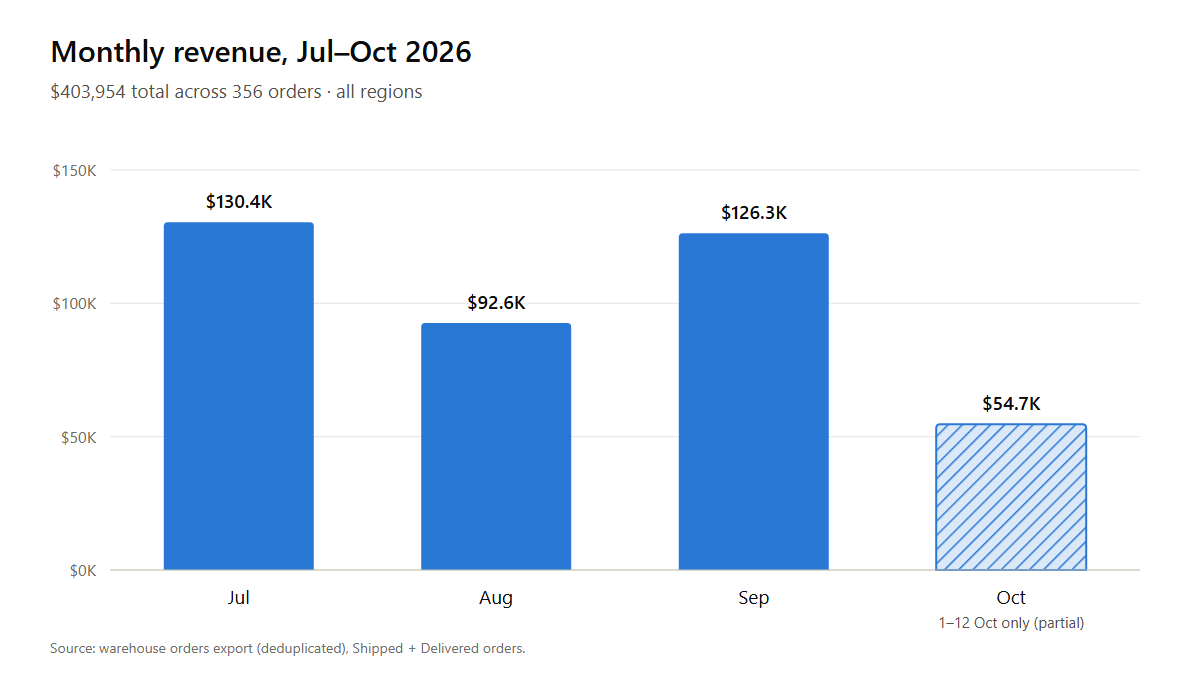
This is a good chart for a deck. The bars start at zero, there’s one message, and October is hatched and labeled as the first twelve days.
One catch: it never saw the chart. When it tried to take a screenshot, my setup blocked it, and it said it was handing the chart over unseen. I rendered it afterwards, and it’s fine.
Task 5: The email to the Head of Sales
The last task was a few lines to Sarah, our Head of Sales, with the headline numbers. I checked every figure against the data, and they’re all right. The email says October covers 12 days, so it isn’t a like-for-like month, and it flags the duplicate Northgate record in case it affects commission. It also used the corrected Northgate figure, not the earlier guess.
It signed the email "Ben". I never typed my name: Claude Code passes it the name from my Git settings. Worth knowing before you let an agent draft anything that goes out under your name.
My verdict: 9 out of 10
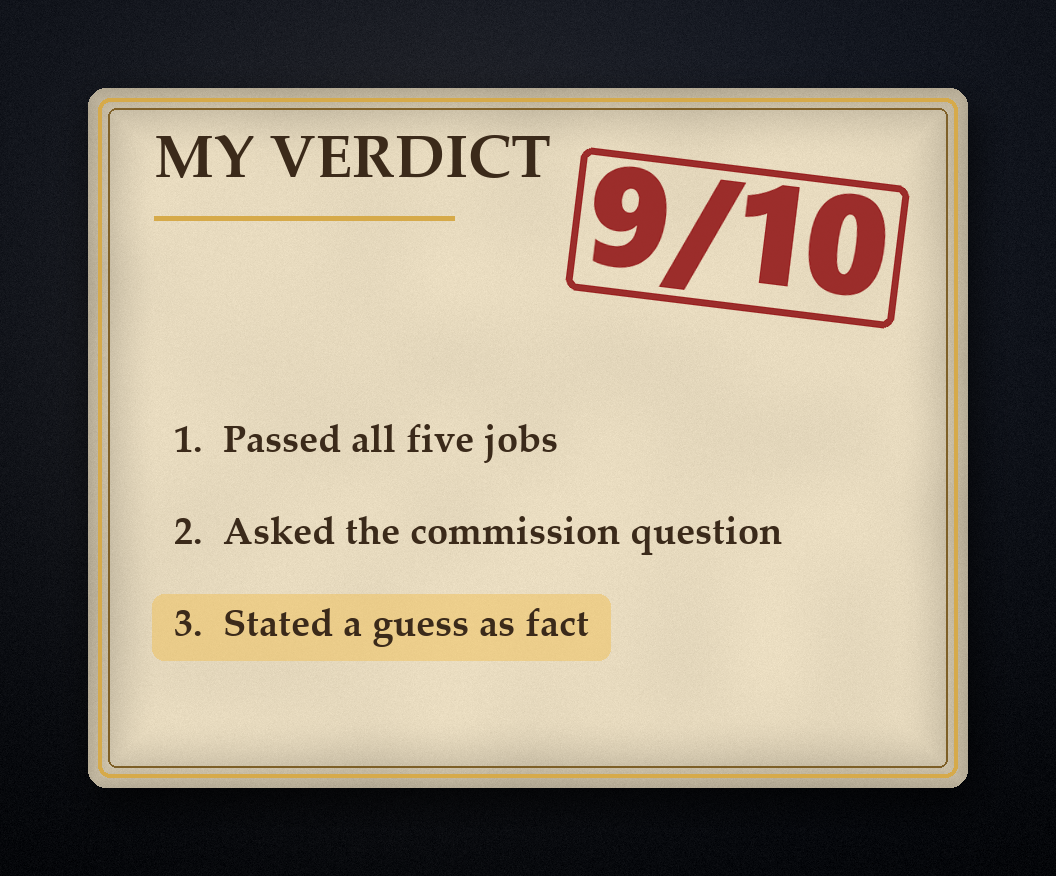
Five tasks, five passes, in 31 steps and just under three minutes, for about a dollar at API prices.
The commission question was better than I’d expect from most new analysts. The missing point is the unchecked Northgate line. It corrected itself one task later, which counts for something, but I’d rather it checked before it wrote it.
One thing I’d still want: it told me October wasn’t a drop but never showed the number that backs that up. Per day, October ran at about $4,556, in line with July ($4,207) and September ($4,210). Twelve days isn’t enough to prove a trend either way, but it’s the number a manager will ask for.
Two lines I’d add before using AI for data analysis
- Before you give a reason for a change, check it in the data and show me the number.
- When a month looks unusually high or low, show it per day before you say anything about it.
The first stops a plausible guess from reaching a stakeholder. The second puts the per-day number in the email, which turns "October isn’t a drop" into something a manager can use.
Where this leaves analysts
Claude handled all five tasks, and it was faster than I’d be. What it didn’t do was check its own explanation before writing it down. That’s still the analyst’s job, and so is deciding what the answer to the commission question should be. The day-to-day of a data analyst role already leans that way.
The skill that matters most here is checking what the agent hands you: reading its code, rerunning a total, spotting a join that doubled something. For that you need Python and SQL you’re comfortable reading, and these Python courses for data professionals are where I’d start.
Free download: the AI analyst test kit
Everything from the test is free:
- orders_export.csv: the warehouse export, 364 rows, messy on purpose
- crm_customers.csv: the CRM list, duplicate record included
- prompts.txt: the five prompts from the test, plus the two lines I’d add
- answer_key.json: the right answers (keep it out of your agent’s folder)
Download the AI analyst test kit (zip, 6 KB)
It’s licensed CC BY 4.0, so use it in your own posts, courses or demos with a link back to this page. If you run it on a different agent, I’d like to hear how it does.

Ben is a full-time data leadership professional and a part-time blogger.
When he’s not writing articles for Data Driven Daily, Ben is a Head of Data Strategy at a large financial institution.
He has over 14 years’ experience in Banking and Financial Services, during which he has led large data engineering and business intelligence teams, managed cloud migration programs, and spearheaded regulatory change initiatives.